


Salesforce Revenue Cloud Integrations Summary
- What it covers: How to connect Salesforce Revenue Cloud with external systems, including CRMs, ERPs, accounting software, payment gateways, and analytics platforms.
- Integration methods: Native connectors, REST APIs, MuleSoft, and third-party middleware solutions.
- Common use cases: Syncing customer data, automating order-to-cash workflows, billing synchronization, and revenue recognition across platforms.
- Key benefit: Eliminates manual data entry, ensures a single source of truth, and accelerates revenue processes across your tech stack.
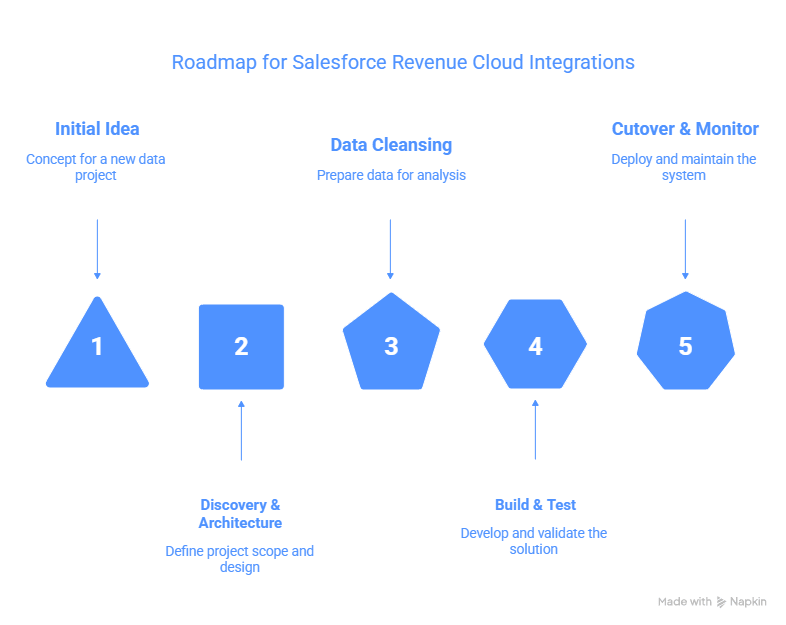
- Implementation approach: Phased roadmap covering discovery, data preparation, testing, and deployment.
Your company uses best-of-breed systems: CRM for sales, ERP for inventory and fulfillment, a billing platform for subscriptions, and accounting software for GL posting. Each system handles its own part, but none shows the full picture. When a deal closes in the CRM, teams often re-enter the order into the ERP manually.
When fulfillment ships products, invoices are still created manually. Most data syncs in overnight batches, causing delays between real-world activity and system updates.
Salesforce Revenue Cloud integrations connect your entire revenue ecosystem. Instead of manual entry and batch processing, orders flow automatically from Revenue Cloud to ERP systems. Payment data syncs in real time to accounting platforms, and billing updates reach analytics dashboards instantly. This reduces errors, speeds up decisions, and frees teams to focus on strategy instead of data work.
This guide explains how to integrate Revenue Cloud, the best methods for different use cases, common challenges with solutions, and a step-by-step implementation roadmap for both single ERP and complex multi-system setups.
How Salesforce Revenue Cloud Connects with External Systems
Salesforce Revenue Cloud operates as the central hub for revenue operations, but most companies use multiple systems across sales, finance, operations, and fulfillment.. The challenge is keeping all systems synchronized without manual data entry, errors, and delays.
Integration Methods: APIs, MuleSoft, Native Connectors, and Middleware
- Salesforce Revenue Cloud integrations connect via multiple approaches, each suited to different scenarios:
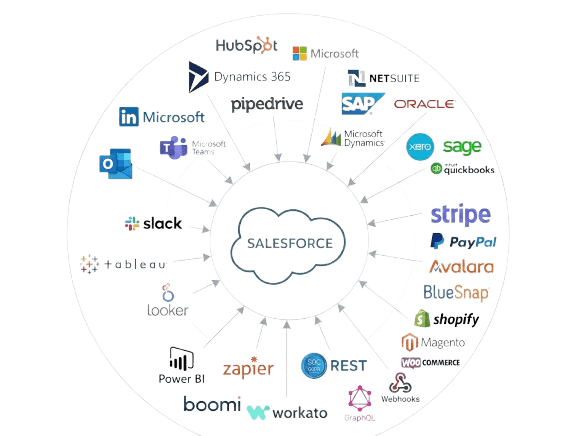
- Native Connectors: Salesforce provides pre-built integrations to common systems like NetSuite, Xero, Stripe, and Zapier. These connectors are tested, documented, and supported—requiring minimal custom development.
- REST APIs: Revenue Cloud exposes comprehensive REST APIs for custom integrations. Development teams build direct connections to systems without pre-built connectors through Salesforce integration solutions.
- MuleSoft (Salesforce’s Integration Platform): For complex enterprise integrations, MuleSoft provides API orchestration, data transformation, and workflow automation. It’s the enterprise standard for Salesforce integrations.
- Third-Party Middleware: Tools like Boomi, Workato, and Zapier bridge Revenue Cloud with external systems when native connectors aren’t available or when complex logic is required.
Real-Time Sync vs. Batch Processing
- Real-time sync: Orders created in Revenue Cloud immediately update ERP systems, payment gateways, and analytics platforms. This approach minimizes delays but requires robust error handling.
- Batch processing: Data syncs at scheduled intervals (e.g., hourly, nightly). This reduces integration complexity but creates temporary data inconsistencies between systems.
Most implementations use hybrid approaches: critical transactions (orders, payments) sync in real-time, while reporting data and historical analytics sync in batch overnight.
Pre-Built Integrations vs. Custom Connectors
Pre-built integrations reduce implementation time and maintenance costs but may lack flexibility for custom business logic. Custom integrations offer complete control but require ongoing development and support.
Integration Platforms & Use Cases
1. CRM System Integration (HubSpot, Dynamics 365, Pipedrive)
Many companies use multiple CRM systems or migrate between them. Salesforce Revenue Cloud integrations synchronize customer data, opportunities, and accounts across CRM systems.
Syncing Opportunities, Accounts, and Customer Data
When an opportunity closes in one CRM system, Revenue Cloud creates an order automatically. Customer account updates (address, billing contact, payment terms) synchronize across all systems, ensuring consistency.
Sales-to-Revenue Operations Hand-Off
Salesforce Revenue Cloud integration with other CRMs creates a clean handoff: sales closes a deal in the CRM, Revenue Cloud creates an order, fulfillment systems begin provisioning, and finance begins billing. No manual data re-entry required.
2. ERP Integration (NetSuite, SAP, Oracle, Microsoft Dynamics)
Enterprise resource planning systems manage inventory, fulfillment, accounting, and supply chain. Revenue Cloud must synchronize with ERPs to ensure orders flow through fulfillment and costs sync to accounting.
Master Data Synchronization
Product catalogs, pricing, customer master data, and general ledger accounts must be consistent between Revenue Cloud and ERP. Integration ensures changes in one system propagate to the other.
Order-to-Cash Workflow Automation
A customer order in Revenue Cloud triggers automatic workflows in the ERP: inventory reservations, shipment scheduling, invoice generation, and payment reconciliation. The entire order-to-cash process enables Salesforce workflow automation without manual handoffs.
3. Accounting System Integration (NetSuite Financial, Xero, Sage, QuickBooks)
Finance teams require revenue data in accounting systems for GL posting, revenue recognition, and financial reporting. Salesforce Revenue Cloud integrations automate this data flow.
Automated Revenue Recognition
Revenue Cloud calculates revenue based on contract terms and ASC 606 rules, then automatically posts journal entries to the accounting system. Month-end close cycles shorten as manual reconciliation disappears.
Journal Entry Generation and GL Posting
Invoices, payments, and adjustments in Revenue Cloud generate GL entries in the accounting system automatically. Finance teams see GL balances update in real-time rather than waiting for daily batch runs.
4. Payment Gateway & Subscription Billing (Stripe, PayPal, Avalara, BlueSnap)
Payment gateways process transactions, and subscription platforms manage recurring billing. Revenue Cloud integrations ensure payment status, failed payments, and usage data sync correctly.
Payment Processing and Reconciliation
When customers pay invoices, payment status updates in Revenue Cloud automatically. Failed payment attempts trigger dunning workflows, and successful payments update accounts receivable records in real-time.
Usage Metering and Consumption Data Ingestion
For companies with usage-based billing, Revenue Cloud integrations ingest metering data from your application. The system calculates overage charges, generates billing, and creates invoices automatically.
5. E-Commerce Platform Integration (Shopify, Magento, WooCommerce)
E-commerce companies use Revenue Cloud to manage complex order types, subscriptions, and bundled products. Integration synchronizes product data, orders, and customer information between e-commerce and Revenue Cloud.
Dynamic Pricing and Bundling
Revenue Cloud manages complex pricing logic (volume discounts, bundled products, tiered pricing), while e-commerce platforms display prices and manage the storefront. Integration ensures catalog and pricing stay synchronized.
Order Status and Fulfillment Synchronization
When customers place orders in e-commerce, orders automatically create in Revenue Cloud with billing information. Shipment status updates flow back to the storefront, keeping customers informed.
6. Analytics & BI Platforms (Tableau, Looker, Power BI)
Business intelligence platforms need real-time revenue data for dashboards, forecasts, and reports. Revenue Cloud integrations push order, billing, and revenue data to BI systems continuously.
Real-Time Revenue Data and Custom Dashboards
Rather than exporting data manually, Revenue Cloud integrations push data to data warehouses or BI platforms in real-time. Finance teams access live dashboards showing revenue, pipeline, and cash flow.
Data Warehouse Integration
For companies using enterprise data warehouses, Revenue Cloud data syncs to Snowflake, BigQuery, or Redshift. BI teams then build dashboards, models, and reports on top of a unified data foundation.
Technical Integration Architecture
MuleSoft: Salesforce’s Native Integration Hub
MuleSoft is Salesforce’s platform, providing API orchestration, data transformation, and workflow automation. For complex Salesforce Revenue Cloud integrations, MuleSoft is the recommended approach.
Pre-Built Connectors for ERPs and Payment Systems
MuleSoft provides pre-built, tested connectors to NetSuite, SAP, Xero, Stripe, and other enterprise systems. These accelerators reduce custom development and maintenance overhead.
Third-Party Middleware Solutions (Boomi, Zapier, Workato)
Not every integration requires MuleSoft. Simpler scenarios use point solutions: Zapier for light automation, Boomi for mid-market integration complexity, Workato for hybrid and cloud scenarios.
When Middleware Is Necessary
Use middleware when native connectors lack the data transformation logic you need, or when you’re integrating 5+ systems and need centralized API governance and monitoring.
API-First Integration (REST, GraphQL, Webhooks)
For custom integrations, Revenue Cloud’s REST API is comprehensive and well-documented. Development teams build direct connections when pre-built options don’t exist.
Building Custom Connectors vs. Purchasing Solutions
Custom development is justified when business logic is highly specific, or when you’re integrating proprietary systems. Standard scenarios typically benefit from pre-built solutions due to lower maintenance costs.
Roadmap for Salesforce Revenue Cloud Integrations
Phase 1 – Discovery & Architecture Design
Objectives: Understand current systems, data flows, and integration requirements.
Activities:
- Inventory all systems that need to connect with Revenue Cloud with the help of Salesforce implementation services.
- Map data flows and identify transformation rules
- Define which data syncs in real-time vs. batch
- Assess data quality in source systems
- Select integration method: native connectors, APIs, or middleware
Deliverables: Integration architecture diagram, data mapping specification, timeline and budget estimate.
Phase 2 – Data Cleansing & Preparation
Objectives: Ensure data quality before integration goes live.
Activities:
- Audit product catalogs, customer master data, and contract terms
- Identify and resolve duplicate records, incomplete data, and inconsistencies
- Map legacy data to Revenue Cloud’s data model through Salesforce migration strategies
- Create data validation rules and quality checks
Deliverables: Clean data, validation rules, migration plan.
Phase 3 – Build, Test, and Validate
Objectives: Build, configure, and thoroughly test integrations.
Activities:
- Configure or develop integrations in sandbox environments
- Build data transformation logic (pricing, tax, currency conversion)
- Test error handling and exception scenarios
- Validate that integration outputs match expected business logic
- Perform load testing to ensure performance at scale
Deliverables: Tested integrations, test results, production deployment plan.
Phase 4 – Cutover & Ongoing Monitoring
Objectives: Deploy integrations to production and monitor performance.
Activities:
- Execute phased cutover (pilot customers first, then all customers)
- Monitor integration health: latency, error rates, data accuracy through Salesforce MSP support
- Establish escalation procedures for integration failures
- Document operational procedures and troubleshooting guides
Deliverables: Production integrations, monitoring dashboards, operational runbook.
Common Integration Challenges & Solutions
Data Synchronization Delays and Conflicts
Challenge: Real-time integration can have latency. If a customer updates their address in the ERP while Revenue Cloud is syncing, which system wins?
Solution: Define data ownership: designate one system as the authoritative source for each data element. Use timestamps and version control to resolve conflicts. Implement error alerts when sync latency exceeds thresholds.
Managing Complex Pricing and Product Catalogs
Challenge: Product catalogs often have hundreds of SKUs with complex pricing rules (volume discounts, regional pricing, customer-specific pricing). Keeping catalogs synchronized is error prone.
Solution: Implement a product information management (PIM) system as the single source of truth. Revenue Cloud and e-commerce platforms pull catalog and pricing from PIM. Changes flow through PIM to all downstream systems.
Subscription Billing Edge Cases
Challenge: Subscriptions generate edge cases: mid-term upgrades, downgrades, prorations, true-ups, and annual true-ups. These scenarios require logic that generic integrations often don’t handle for deeper technical approaches, see our guide on advanced Revenue Cloud scenarios.
Solution: Use specialized subscription billing platforms (Zuora, Aria, NetSuite OneWorld) as the billing system of record, with Revenue Cloud managing quoting and orders. Let the subscription platform handle complex billing scenarios.
Compliance and Security Across Platforms
Challenge: Sensitive customer and payment data must remain secure as it moves between systems. Regulatory requirements (GDPR, HIPAA, PCI-DSS) apply across all systems.
Solution: Encrypt data in transit (TLS 1.2+) and at rest. Minimize sensitive data movement: use tokenization for payment information, never pass PII in logs. Implement role-based access controls (RBAC) and audit logging.
Best Practices for Integration Success
Define Clear Data Ownership Upfront
Specify which system is authoritative for each data element. For example: Revenue Cloud owns “customer name,” ERP owns “inventory,” payment gateway owns “payment status.” This prevents conflicts and simplifies troubleshooting.
Automate Manual Processes Before Integration
Don’t automate a broken manual process. First, fix business processes, then automate them. Integrations amplify inefficiency: if your manual process is 10% accurate, your automated process will be too.
Test Extensively Across Edge Cases
Test common scenarios and edge cases: mid-term changes, failed payments, contract amendments, prorations, and system outages. Validate error handling and recovery workflows thoroughly.
Monitor Integration Health in Real-Time
Implement monitoring dashboards showing integration latency, error rates, and data accuracy. Alert teams when integrations degrade so issues get resolved quickly rather than being discovered during month-end close.
Why Revenue Cloud Integration Matters
Eliminating Manual Data Entry and Errors
Manual data entry between systems creates errors, delays, and rework. Integrations eliminate this friction, freeing teams to focus on strategy rather than data management.
Improving Revenue Visibility Across Systems
When data flows automatically between Revenue Cloud, ERP, and finance systems, revenue leaders see accurate, real-time visibility into order status, cash flow, and forecast accuracy.
Accelerating Quote-to-Cash Cycles
Integrated workflows automate the entire quote-to-cash process: quote approval, order creation, fulfillment, invoicing, and payment. Cycles shorten from weeks to days.
Enhancing Forecasting Accuracy
Real-time data in BI systems enables accurate, dynamic forecasting. Finance sees revenue impact immediately rather than waiting for the month-end close processes.
Reducing Operational Complexity
Integrations reduce manual handoffs between sales, operations, finance, and accounting. Teams focus on their core functions rather than managing data silos.
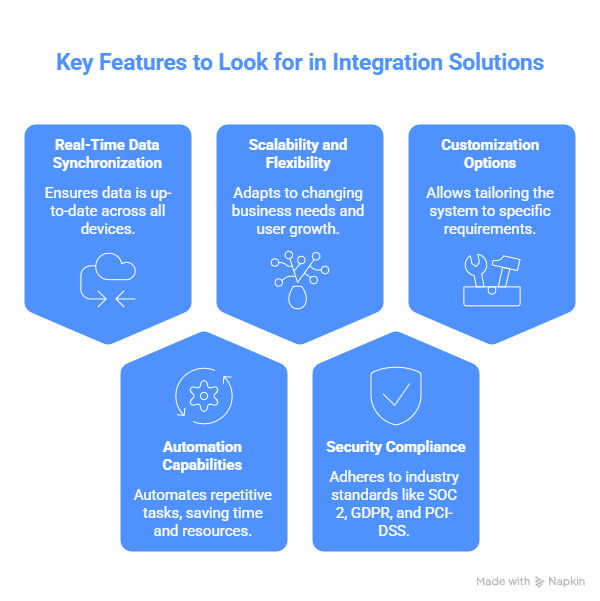
Key Features to Look for in Integration Solutions
Real-Time Data Synchronization
Look for integrations that sync data in real-time (or near-real-time) rather than batch processes running daily. Real-time sync reduces decision latency and prevents downstream issues.
Automation Capabilities
Integration solutions should automate complex logic: pricing calculations, tax compliance, multi-currency conversion, and workflow routing. AI-powered Salesforce workflows implementation extend this automation further, reducing manual intervention and errors..
Scalability and Flexibility
As your business grows, integrations must scale without manual intervention. Look for solutions that handle millions of transactions without degradation.
Security Compliance (SOC 2, GDPR, PCI-DSS)
Verify that integrations meet your compliance requirements. Ensure data encryption, audit logging, and access controls are enforced throughout the integration.
Customization Options
Evaluate whether the integration solution accommodates your custom business logic. Pre-built connectors work well for standard scenarios, but custom integrations may be needed for unique requirements.
When to Hire a Revenue Cloud Integration Partner
Red Flags: Internal Capacity Gaps
Hire a partner if your internal team lacks Salesforce expertise, integration architecture experience, or capacity to execute within your timeline. Partner expertise accelerates implementation and reduces risk.
Questions to Ask Integration Vendors
- What’s your experience integrating Revenue Cloud with our specific ERP/payment platform?
- What’s the typical timeline and cost for our integration scope?
- How do you handle data quality issues and edge cases?
- What monitoring and support do you provide post-launch?
Success Metrics and KPIs
Define success metrics upfront: integration latency (target: <5 min), data accuracy (target: >99%), error rates (target: <0.5%), and operational cost savings (target: 30%+ reduction).
Conclusion
Salesforce Revenue Cloud integrations connect your revenue operations to your entire technology ecosystem. By automating data flows between sales, operations, finance, and fulfillment systems, Revenue Cloud integrations eliminate manual processes, reduce errors, and accelerate revenue cycles.
Whether you’re integrating with a single ERP or orchestrating a complex multi-system landscape, successful integrations depend on clear architecture, high data quality, and rigorous testing. A phased implementation approach—starting with critical integrations, then expanding—reduces risk and builds organizational confidence.
For a complete walkthrough, see our Revenue Cloud implementation step-by-step guide.
Ready to integrate Revenue Cloud with your existing systems? Our Salesforce integration specialists can assess your technology landscape and define a roadmap aligned with your business goals. Book a consultation to discuss your integration priorities and timeline.
FAQs
What’s the difference between Salesforce CPQ and Agentforce Revenue Management (ARM)?
CPQ (Configure Price Quote) generates accurate quotes but stops at contract signature. Agentforce Revenue Management extends automation through billing, revenue recognition, renewals, and customer expansion.
Learn more about transitioning between platforms in our CPQ to Revenue Cloud migration guide.
Can Revenue Cloud integrate with NetSuite without middleware?
Yes. Salesforce provides a pre-built connector to NetSuite that handles order synchronization, customer data sync, and GL posting. For complex scenarios, middleware (MuleSoft or Boomi) may provide more flexibility.
Do I need middleware to connect Revenue Cloud with other platforms?
Not always. Pre-built connectors work for common integrations (NetSuite, Xero, Stripe, Shopify). Middleware is beneficial when integrating 5+ systems, when complex data transformation is needed, or when pre-built connectors don’t exist.
How long does a typical Revenue Cloud integration project take?
Simple integrations (one or two pre-built connectors) take 4–8 weeks. Complex integrations with multiple systems, custom development, and extensive testing take 3–6 months. Enterprise-scale programs can extend 6–12 months.
How does Revenue Cloud handle usage-based billing from external platforms?
Revenue Cloud integrates with metering platforms and ingests usage data automatically. The system calculates overage charges, applies tier adjustments, and generates billing without manual reconciliation.
What’s the best way to sync customer data across multiple systems?
Designate one authoritative source for customer master data (usually the CRM or ERP). Other systems pull customer data from this source. Implement real-time sync to keep all systems current.
Which integration approach is most cost-effective?
Pre-built connectors are most cost-effective for standard integrations. Custom REST API integrations become cost-effective at scale (many systems integrated). MuleSoft is a strategic investment for enterprise governance and reusable integration patterns.
How do we ensure real-time revenue recognition when integrating?
Implement integrations that push invoice and payment data to accounting systems in real-time. Configure automated revenue recognition rules that post GL entries immediately, rather than waiting for batch close processes.