


Somewhere in your company, a person spends part of every day exporting records from one system and importing them into another. The export breaks when a column moves, the import creates duplicates, and nobody notices until the numbers don’t reconcile. Jitterbit Salesforce integration exists to retire that job.
This guide covers how a Jitterbit integration with Salesforce connects Salesforce to your ERP, ecommerce, and support systems through Harmony, the features that matter in practice, real use cases, setup steps, advanced patterns, and what to look for if you bring in an implementation partner.
Folio3’s Salesforce integration services team delivers both Jitterbit and alternative implementations.
Summary
- What Jitterbit is and why teams pick it for Salesforce connectivity
- Five capabilities that matter in production: real-time sync, no-code workflows, scale, visual design, monitoring
- Use cases across sales, support, ERP, ecommerce, and HR
- A setup path from planning through go-live testing
- Advanced patterns: multi-source consolidation, conditional mapping, retry logic, sync scheduling
- Implementation challenges, deployment best practices, and partner selection criteria
Understanding Jitterbit Salesforce Integration
Why Jitterbit Salesforce Integration Works for Salesforce Teams
Jitterbit’s Harmony platform is an iPaaS with a long Salesforce history; its free Cloud Data Loader was many admins’ first bulk-data tool, and that lineage shows in connector depth. The connector supports standard and custom objects, the Bulk API, upserts via external IDs, and outbound message listening for event-driven flows. A Salesforce consulting partner can help evaluate whether Jitterbit fits your architecture.
Practically, teams choose Jitterbit for three reasons: the visual Cloud Studio designer lets admins build and read integrations without code, agents can run in Jitterbit’s cloud or on-premise for firewall-bound systems, and pricing tends to land below MuleSoft for comparable mid-market workloads. For teams evaluating Jitterbit integration with Salesforce, those deployment options matter when ERP or database access sits behind a firewall.
How It Differs From Manual Integration
Manual integration is CSV exports, spreadsheet cleanup, and Data Loader imports: it scales with headcount, breaks on format changes, and duplicates records on reruns. A Jitterbit operation maps, transforms, validates, and loads automatically, with retry logic and alerts.
The difference compounds: a nightly manual sync costs an hour a day forever; the automated version costs a few weeks once. See ERP integration with Salesforce for details on how middleware transforms manual workflows.
Key Features of Jitterbit Salesforce Integration
Data Synchronization in Real-Time
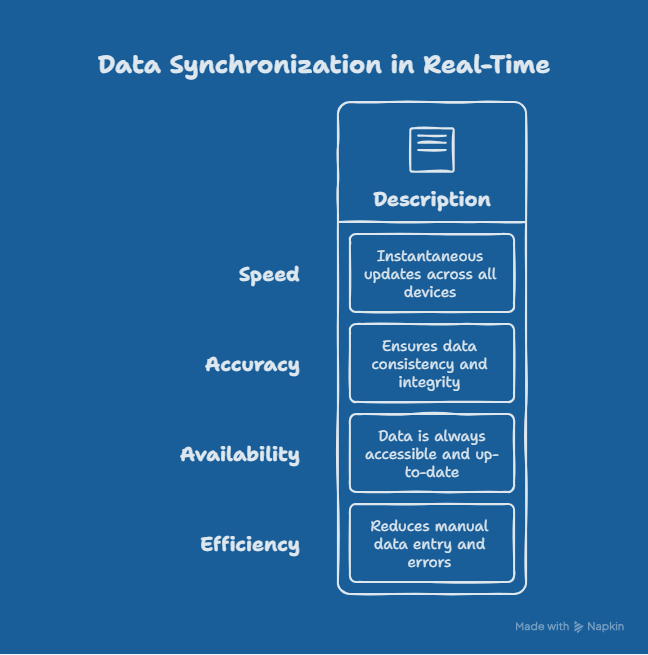
Data Synchronization in Real-Time Jitterbit listens for Salesforce outbound messages and platform events, moving changes to target systems within seconds. Real-time sync suits data where staleness has a cost: credit status, case escalations, inventory levels. For everything else, scheduled sync conserves API calls. Learn more about this pattern in our Salesforce Revenue Cloud integrations guide.
Automated Workflows Without Code
Automated Workflows Without Code Cloud Studio’s drag-and-drop canvas builds most integrations without scripting; a typical Salesforce-to-ERP flow is 90% visual configuration, with Jitterbit’s scripting language filling complex gaps. Explore Salesforce automation tools for comparison across workflow platforms.
Enterprise Scalability
Bulk workloads run as chunked, parallel Bulk API jobs rather than record-by-record calls: the difference between a two-hour migration and one that exhausts your API limit by noon.
Intuitive Visual Interface
Integration logic any trained admin can open and understand is an underrated asset; a visual canvas survives staff turnover far better than a folder of custom Apex.
Advanced Analytics and Monitoring
The Management Console shows runtimes, success rates, and per-record errors, with failure alerting, so you hear about a broken sync at 6 a.m. from an alert, not at noon from a sales manager.
Real-World Use Cases
| Use Case | Systems Connected | Typical Payoff |
|---|---|---|
| Sales and marketing alignment | Marketo/HubSpot ↔ Salesforce | Lead response in minutes, not hours |
| Support optimization | Zendesk/ServiceNow ↔ Salesforce | Full customer context per case |
| ERP and CRM sync | NetSuite/SAP ↔ Salesforce | Same-day order processing |
| E-commerce | Shopify/Magento ↔ Salesforce | Unified purchase history |
| HR automation | Workday/BambooHR ↔ Salesforce | Automated user provisioning |
Sales and Marketing Alignment
Sales and Marketing Alignment
Leads flow from marketing platforms into Salesforce with dedupe and routing, and campaign responses sync back for attribution. Speed matters: lead conversion decays sharply within the first hour. See Salesforce lead management for details on lead flow and automation.
Customer Support Optimization
Customer Support Optimization Tickets appear as Salesforce cases with account and entitlement context, so agents stop asking customers for information the company already holds and account owners see support health before renewals. Similar patterns apply to Salesforce integrations for ecommerce scenarios.
ERP and CRM Integration
The classic order-to-cash flow: closed-won opportunities create ERP sales orders, and fulfillment plus invoice status sync back. Companies moving off manual order entry typically cut processing from 1 to 2 days to under an hour and remove transcription errors from billing.
E-Commerce Integration
Orders, customers, and refunds from Shopify or Magento land in Salesforce, giving sales and service a complete purchase history and enabling segmentation on actual buying behavior. See Salesforce ecommerce integration for platform-specific setup details.
Human Resources Automation
New-hire HRIS records trigger Salesforce user provisioning and territory assignment; departures trigger deactivation, closing a common security gap.
Getting Started with Jitterbit Integration with Salesforce
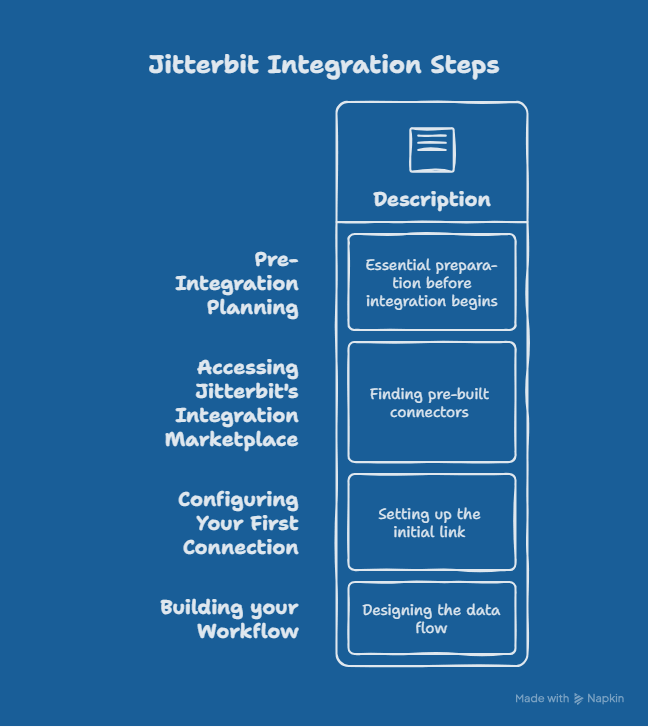
Pre-Integration Planning
Define flows, owners, and success metrics before opening the design canvas: each object, its system of record, sync direction, and frequency. Skipping this is why integrations get rebuilt at month three.
Accessing Jitterbit’s Integration Marketplace
Check the marketplace for pre-built templates and process recipes matching your flow. Standard patterns like Salesforce-to-NetSuite order sync exist as starting points that cut build time roughly in half.
Configuring Your First Connection
Create a dedicated Salesforce integration user with a least-privilege permission set, authenticate via OAuth, and point everything at a full sandbox. In a Jitterbit integration with Salesforce, this dedicated user keeps audit trails clean and prevents a personal login from breaking production jobs. Never build against production.
Building your Workflow
Construct the operation in Cloud Studio: source query, transformation map, target write. Use upserts keyed on external IDs everywhere, handle picklist and date-format mismatches in the map, and add error routing before you consider the flow done.
Testing Before Go-Live
Test at production scale. A 50-record test hides the API limit and governor problems that a 50,000-record run exposes. Run the same job twice to verify no duplicates appear and deliberately feed malformed records to confirm error handling works.
Advanced Jitterbit Salesforce Integration Patterns
Multi-Source Data Consolidation
Operations can read from several systems, merge on a shared key, and write a consolidated record to Salesforce, which is how Customer 360 views get built when data lives in four places.
Conditional Mapping and Transformation
Scripted conditions route and reshape records by criteria: region-specific field mapping, currency conversion, tiered account classification. Keep shared logic in reusable scripts so one fix propagates everywhere.
Error Handling and Retry Logic
Distinguish transient failures (timeouts, API limit hits) from permanent ones (validation errors). Retry transient failures with backoff automatically; queue permanent ones for human review with the record payload attached. This single design choice determines whether your integration needs daily babysitting.
Scheduled vs. Event-Driven Syncs
Event-driven syncs deliver seconds-level latency but consume events and API calls per change. Scheduled batch syncs trade latency for efficiency. Most mature deployments mix both: events for the five fields where speed matters, nightly batches for everything else.
Common Implementation Challenges
Complex Field Mapping Scenarios
Multi-currency amounts, nested line items, and record-type-dependent fields break naive one-to-one mapping. Budget mapping time realistically: a full order-to-cash flow involves 80 to 150 field mappings, and the edge cases take longer than the happy path. See NetSuite and Salesforce integration for real-world mapping complexities.
API Governance and Rate Limits
API Governance and Rate Limits Salesforce Enterprise Edition includes 15,000 daily API calls plus per-license additions. Design around the limit from day one: Bulk API for volume, events instead of polling, and off-hours scheduling for batch jobs. API capacity factors into Salesforce implementation cost planning.
Data Quality and Validation
Integrations expose the data problems both systems were hiding orphaned records, format drift, duplicate accounts. Plan a cleanup pass before the first full sync, or the integration will faithfully replicate your mess at machine speed.
Change Management and User Adoption
When automation replaces a manual process, the person who ran that process needs a new role in it, usually exception handling. Communicate this early; integrations have been quietly sabotaged by teams who felt automated out.
Best Practices for Successful Deployment
Design Phase Best Practices
One system of record per field, external IDs on every synced object, and documented mapping decisions. Start with one flow and stabilize it before adding the next. Proper Salesforce customization design underpins all stable integrations.
Testing and Validation Strategy
Production-scale volumes, duplicate-safety verification via reruns, and deliberate bad-data injection. Sign off on error behavior, not just success behavior.
Production Monitoring Setup
Alerts on operation failures with record IDs attached, a weekly review of error trends for the first month, and API consumption tracking in Salesforce’s usage report.
Documentation and Knowledge Transfer
A data dictionary, an operations runbook, and named ownership. The test: could a new admin diagnose a failed sync using only the documentation?
Why Organizations Choose Jitterbit for Salesforce
Faster Time-to-Value
Template-based starts and visual design get standard flows to production in 2 to 5 weeks, versus 2 to 3 months for equivalent custom-coded integrations.
Lower Total Cost of Ownership
No custom codebase to maintain, vendor-maintained connectors that absorb API changes, and admin-level maintainability instead of developer dependency.
Reduced IT Dependency
Ops teams adjust mappings and schedules themselves. IT stays involved for architecture and security, not every field change.
Flexible Scaling Options
The same platform runs a single lead sync or a 30-operation enterprise deployment, and agents can move between cloud and on-premises as requirements change.
Selecting a Jitterbit Partner
Most mid-size teams bring in a partner for the initial build. Evaluate on five criteria.
Expertise in Jitterbit Development
Ask for certified Jitterbit developers and examples of built operations, including error handling design, which separates experienced builders from demo-level ones.
Customized Integration Solutions
Your order flow has quirks (approval steps, custom pricing, multi-entity billing) that templates won’t cover. The partner should ask about your edge cases in the first call, not after the contract.
End-to-End Implementation Support
Coverage from discovery through hypercare, not just build. The two weeks after go-live surface issues that sandbox testing cannot.
Proven Track Record with Salesforce
Jitterbit skill without Salesforce depth produces integrations that fight governor limits and validation rules. Look for Salesforce certifications alongside Jitterbit ones; Folio3’s team pairs both.
Commitment to Continuous Innovation
Jitterbit ships platform updates regularly (including its newer AI-assisted features), and your partner should be tracking them rather than building on patterns from 2019.
Partner Service Offerings for Jitterbit Salesforce
Strategic Consultation and Planning
Integration architecture, system-of-record decisions, and a phased roadmap sized to your API limits and data volumes.
Implementation and Integration Services
The core build: connections, operations, mappings, and error handling, delivered against the plan.
Custom Development and Customization
Scripted transformations, custom connectors for niche systems, and Salesforce-side components like platform events or the integration depend on.
Testing, QA, and Validation
Volume testing, duplicate-safety verification, and user acceptance cycles before cutover.
Training, Enablement and Support
Admin training on the Management Console, runbook handover, and optional ongoing support through a managed services arrangement.
Migration: Moving From Legacy Systems to Jitterbit
Assessing Your Current Architecture
Inventory existing integrations, including undocumented ones living in scheduled Apex jobs and desktop Data Loader scripts, then decide per flow: migrate, retire, or rebuild.
Data Migration Strategy
For legacy CRM migrations, sequence matters: accounts first, then contacts, then transactional records, with external IDs preserving relationships. Reversing the order creates orphaned records that are tedious to repair at volume.
Minimal Downtime Approach
Run old and new integrations in parallel against a reconciliation report for one business cycle, then cut over. Big-bang cutovers save a week and risk a month of cleanup.
Key Takeaways
- Jitterbit fits teams that want middleware an admin can maintain, with connector depth on the Salesforce side
- Design around API limits, external IDs, and error handling from the first operation
- Test at production volume and verify rerun safety before go-live
- Mix event-driven and scheduled syncs by data urgency rather than defaulting to one
- If using a partner, weight Salesforce depth as heavily as Jitterbit certification
Conclusion
Manual data movement between Salesforce and your other systems is a recurring cost that compounds with every new record, and Jitterbit Salesforce integration replaces it with automated operations that an ops team can own. The builds that last share the same traits: clear systems of record, rerun-safe upserts, honest error handling, and testing at real volume.
Ready to retire the export-import routine? Book a call with Folio3’s integration team to scope your first Jitterbit flow.
FAQs
What Is Jitterbit Salesforce Integration and Who Needs It?
Jitterbit Salesforce integration connects Salesforce to ERPs, ecommerce platforms, support tools, and databases through Jitterbit’s Harmony iPaaS. It suits companies still moving data manually between Salesforce and other systems, typically mid-market and enterprise teams running two or more systems that share customer, order, or product data.
How Does Jitterbit Integration With Salesforce Compare to Alternatives?
Jitterbit sits between lightweight tools like Zapier and heavyweight platforms like MuleSoft. It handles enterprise volumes, on-premise systems, and complex transformations that Zapier cannot, at lower licensing and skill cost than MuleSoft. Compared to Boomi, capabilities are similar; the choice usually comes down to pricing, existing team familiarity, and connector fit.
How Long Does a Typical Jitterbit Salesforce Integration Take?
A standard Jitterbit integration with Salesforce, such as lead sync or order creation, takes 2 to 5 weeks including mapping, error handling, and volume testing. Multi-system deployments run 8 to 14 weeks. Template-based builds from the Jitterbit marketplace cut those timelines roughly in half for standard patterns like Salesforce-to-NetSuite.
Can Jitterbit Handle Real-Time Data Sync?
Yes. Jitterbit listens for Salesforce outbound messages and platform events, moving changes to target systems within seconds without polling. Real-time sync is best reserved for urgent data like escalations or credit status, with scheduled batch syncs handling volume data, since event-driven flows consume API resources per change.
What’s Included in Jitterbit Partner Support?
Typical engagements cover architecture planning, the build, mapping design, error handling, volume testing, cutover, and two to four weeks of hypercare. Ongoing arrangements add monitoring, error triage, and mapping updates as schemas and Salesforce releases change.
Is Jitterbit Secure for Sensitive Business Data?
Jitterbit maintains SOC 2 compliance, encrypts data in transit and at rest, and supports role-based access control across projects and environments. For data that cannot leave your network, on-premise agents process integrations behind your firewall while the design layer stays in the cloud. Credentials are stored encrypted, never in operation logic.
Can I Integrate Multiple Systems With Salesforce Using Jitterbit?
Yes. A single Harmony environment can run dozens of operations connecting Salesforce to ERPs, ecommerce platforms, support desks, and databases simultaneously. Multi-source operations can also merge data from several systems into consolidated Salesforce records. Build incrementally: stabilize one flow before adding the next, and govern the portfolio with naming and ownership conventions.