
Connecting with customers, partners, and employees has become more complex than ever. Companies accumulate vast amounts of customer data across multiple systems, but turning that information into meaningful, personalized digital experiences remains challenging. Salesforce Experience Cloud solves this by creating branded portals and communities that connect directly to your CRM data.
What is Salesforce Experience Cloud?
Salesforce Experience Cloud is a digital experience platform (DXP) that allows businesses to create branded, customizable portals, websites, and mobile apps for customers, partners, and employees. Built on Salesforce Customer 360, it connects all your CRM data to create seamless interactions across every touchpoint.
Learn more about what Salesforce is used for across different business functions.
Unlike standalone website builders, Experience Cloud leverages your existing Salesforce data. Every interaction, support case, and purchase history automatically flows into these digital experiences without additional integration work. Organizations working with Salesforce consulting services can maximize this data integration to create truly personalized portals. Customers see their complete account information, partners access real-time sales data, and employees collaborate with full context.
Over 11,820 live websites use Salesforce Experience Cloud, powering millions of digital interactions monthly. Organizations across industries use this platform to reduce support costs (30-40% typical reduction), accelerate partner sales, and improve employee productivity.
Are Salesforce Experience Cloud and Community Cloud the Same?
Yes, they’re the same platform. Salesforce Community Cloud was rebranded to Experience Cloud in 2020, though the core technology remains unchanged. The rebranding reflected Salesforce’s strategic shift toward emphasizing comprehensive digital experience creation rather than just community building.
The name change expanded capabilities. While Community Cloud focused on forums and community spaces, Experience Cloud encompasses everything from full-featured websites to e-commerce storefronts and mobile applications. Key changes included:
- Expanded Capabilities: Platform evolved from basic community forums to support complex digital experiences including content management, mobile publishing, and AI-powered personalization through Salesforce Einstein.
- Updated Terminology: “Community” became “Site,” Lightning Community became Experience Builder site, and Community templates became Experience Builder templates.
- Enhanced Features: Platform gained CMS improvements, Data Cloud integration for personalization, and advanced analytics for measuring performance.
- Strategic Positioning: The rebranding acknowledged businesses needed complete digital experience platforms handling everything from marketing websites to complex partner portals with integrated e-commerce.
For existing users, the transition was seamless. Communities became “sites” within Experience Cloud, with access to new capabilities as they rolled out. Organizations needing platform transitions can leverage Salesforce migration services for smooth upgrades.
Experience Cloud
byu/Fatal_Monkey_Blaster insalesforce
What Types of Communities Does Salesforce Experience Cloud Have?
Experience Cloud supports three primary community types, each designed for specific business needs and user groups. Understanding these distinctions helps you choose the right approach for your organization.
1. Customer Communities (Self-Service)
Customer communities provide self-service portals where customers can find answers, submit support cases, and access account information without contacting your support team directly.
These communities excel at:
- Knowledge base access with searchable articles and FAQs
- Case management where customers create, track, and resolve support tickets
- Community forums for peer-to-peer support and knowledge sharing
- Account management for viewing order history, subscriptions, and billing
- Product documentation and how-to guides
A telecommunications company, for example, might build a customer community where subscribers troubleshoot connectivity issues, manage their service plans, pay bills, and participate in forums discussing network coverage. This reduces call center volume while improving customer satisfaction through instant access to information.
2. Partner Communities (Partner Relationship Management)
Partner communities connect your business with distributors, resellers, brokers, and sales partners. These portals facilitate collaboration, deal registration, and partner enablement.
Key capabilities include:
- Lead distribution and deal registration to prevent channel conflict
- Co-branded marketing materials and sales resources
- Training and certification programs for partner enablement
- Performance tracking with dashboards showing sales metrics and incentives
- Opportunity management where partners can update deal status
Consider a software company with a global network of resellers. Their partner community provides localized marketing content, tracks deal registrations in real-time, offers product training certifications, and displays performance incentives. Partners log in to access what they need without constant back-and-forth with internal teams.
3. Employee Communities (Internal Collaboration)
Employee communities create internal hubs where teams collaborate, share knowledge, and access company resources. These function as digital workplaces that connect employees regardless of location.
These communities support:
- Department-specific spaces for HR, IT, sales, and other teams
- Project collaboration with file sharing and team workspaces
- Internal knowledge bases with policies, procedures, and best practices
- Onboarding programs for new employees
- Recognition programs celebrating achievements and milestones
A distributed enterprise might build an employee community where remote workers access HR documents, submit IT tickets, collaborate on cross-functional projects, and participate in company-wide discussions. This becomes especially valuable for organizations with multiple locations or large remote workforces.
Hybrid Approaches
Many organizations combine these community types. A manufacturing company might have a customer community for end users, a partner community for distributors, and an employee community for internal teams all running on the same Experience Cloud platform but with separate access and branding.
Experience Cloud Site as main Org? (Yay! or Nay!?)
byu/gulpz27 insalesforce
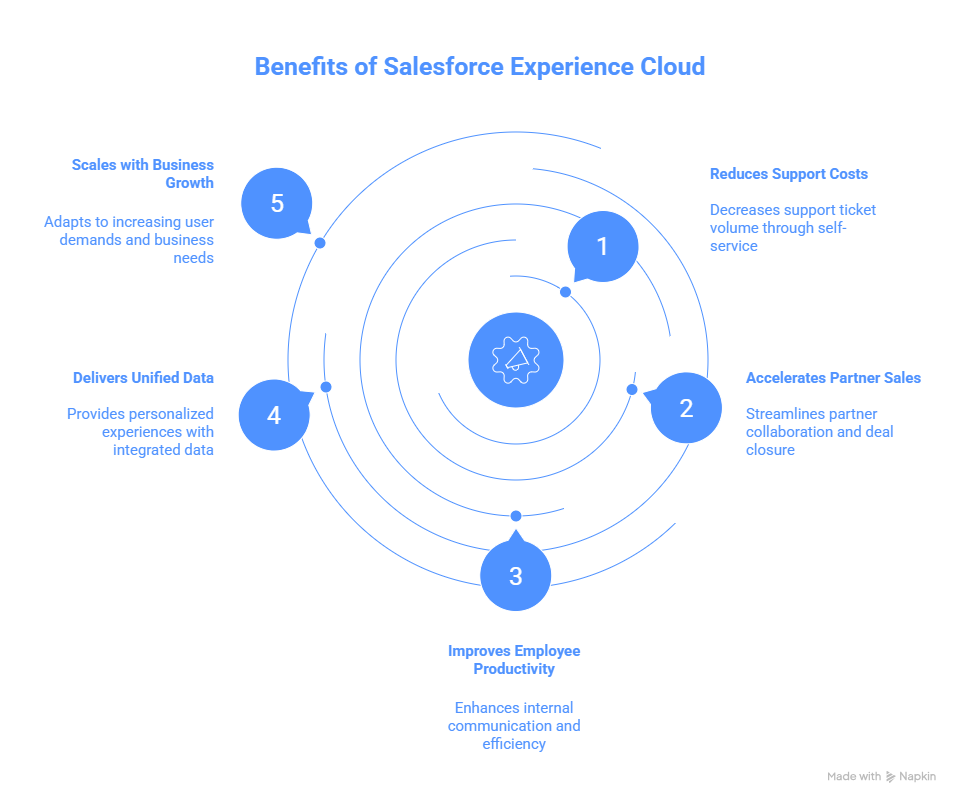
What are the Benefits of Salesforce Experience Cloud?
Organizations implementing Experience Cloud typically see measurable improvements across customer service, sales efficiency, and operational costs. A Forrester study found companies using Experience Cloud achieve an average 342% ROI in three years.
1. Reduces Support Costs Through Self-Service
Self-service portals dramatically decrease support ticket volume by empowering customers to find answers independently. Organizations report 30-40% reductions in support cases after implementation. IBM resolved customer questions in 12% of sessions without creating support cases. If each support ticket costs $15 and you handle 10,000 monthly tickets, a 35% reduction saves over $60,000 monthly.
2. Accelerates Partner Sales and Enablement
Partner communities streamline how you work with channel partners and distributors. By providing centralized access to sales resources, real-time inventory, and deal registration tools, you eliminate friction. Partners close deals faster with instant access to pricing, marketing collateral, and specifications. Deal registration prevents channel conflict by establishing clear opportunity ownership.
3. Improves Employee Productivity
Internal communities break down silos by connecting employees across departments. Productivity gains compound when employees spend less time searching for information across disconnected systems. Remote workers stay connected to resources and culture, while cross-functional projects move faster with dedicated collaboration spaces.
4. Delivers Unified Data and Personalization
Because Experience Cloud builds on Salesforce CRM, every digital experience connects to complete customer data. Customers see their account details and purchase history. Partners view opportunities assigned specifically to them. The platform uses Salesforce Einstein AI to recommend relevant content and surface information based on behavior patterns.
5. Scales with Business Growth
Whether serving 100 users or 100,000, Experience Cloud scales without performance degradation. The pricing model scales too, with different license tiers based on user counts and features. Small businesses start with basic communities and expand capabilities as requirements evolve.
What are the Main Tools and Features of Salesforce Experience Cloud?
Experience Cloud provides a comprehensive toolkit for building, managing, and optimizing digital experiences. These features work together to create powerful portals without extensive custom development.
Experience Builder: Drag-and-Drop Site Creation
Experience Builder is the primary interface for designing and customizing communities. Its drag-and-drop functionality lets administrators and business users create professional sites without coding knowledge.
The builder provides:
- Pre-built page templates for common use cases (homepage, article, profile)
- Component library with 100+ ready-to-use elements (forms, charts, lists)
- Real-time preview showing exactly how pages appear to users
- Responsive design tools ensuring mobile optimization
- Theme customization for colors, fonts, and styling
While Experience Builder handles most scenarios through clicks, developers can extend it with custom Lightning Web Components (LWC) for specialized functionality. Organizations requiring advanced customization can leverage Salesforce customization services to build tailored solutions. This balance between low-code simplicity and development flexibility accommodates both business users and technical teams.
Content Management System (CMS)
The built-in CMS lets you create, organize, and publish content across your digital experiences. Unlike standalone content management systems requiring separate integrations, Experience Cloud’s CMS lives within your Salesforce environment.
Explore Salesforce content management capabilities for enterprise-level solutions
Key CMS capabilities:
- Content types for structured information (articles, FAQs, documents)
- Media library for images, videos, and downloadable files
- Version control tracking content changes over time
- Publishing workflows requiring approval before content goes live
- Multi-language support for global audiences
- Content targeting showing different content to different user segments
The CMS becomes especially powerful when combined with Salesforce data. You can automatically display relevant knowledge articles based on customer support history or show partner resources specific to their region and certification level.
Experience Workspaces: Centralized Management
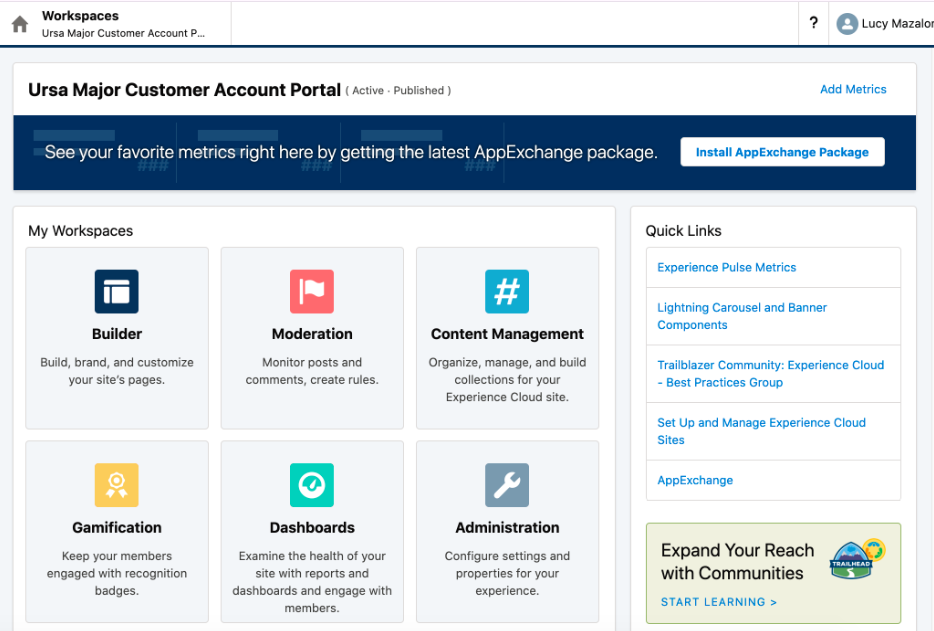
Experience Workspaces provide administrators with a unified dashboard for managing communities. Instead of jumping between different interfaces, admins handle all community management tasks from one location.
Workspaces include:
- User management for adding, removing, and modifying member access
- Moderation tools for reviewing user-generated content before publication
- Analytics dashboards showing engagement metrics and popular content
- Setup wizards guiding administrators through configuration tasks
- Settings panels for controlling community behavior and features
For teams managing multiple communities, Workspaces streamline operations significantly. You can quickly switch between different sites, apply consistent settings, and monitor performance across all your digital experiences.
Mobile Publisher: Native Mobile Apps
Beyond base licensing, consider these potential additional costs:
1. Professional Services: Implementation, customization, and integration typically require consultant support. Expect $10,000-$100,000+ depending on complexity.
2. Developer Resources: Custom components, integrations, and advanced features need developer time. Organizations can hire Salesforce developers for ongoing development costs and enhancements.
3. Data Storage: Large communities generating significant content may require additional data storage beyond included limits.
4. Training: User training ensures adoption and proper platform utilization. Consider Salesforce managed services for ongoing optimization and support.
Mobile Publisher transforms web-based communities into native mobile applications for iOS and Android. Rather than just making sites mobile-responsive, this creates true app experiences distributed through Apple App Store and Google Play.
Mobile Publisher features:
- Push notifications keeping users engaged with timely updates
- Offline access allowing users to view content without connectivity
- Device-specific optimizations leveraging native mobile capabilities
- Branding customization matching your app design guidelines
- Biometric authentication for enhanced security
Healthcare providers use Mobile Publisher to give patients mobile access to test results and appointment scheduling. Field service organizations deploy apps where technicians access work orders and documentation offline.
Einstein AI: Personalization and Recommendations
Salesforce Einstein brings artificial intelligence to your digital experiences. Rather than showing the same content to everyone, Einstein personalizes what users see based on their behavior, role, and needs.
Einstein capabilities include:
- Content recommendations suggesting relevant articles and resources
- Expert matching connecting users with knowledgeable community members
- Search optimization understanding natural language queries
- Bot integration providing automated responses to common questions explore Agentforce implementation for advanced AI chatbot capabilities
- Predictive insights forecasting which content will engage specific users
A customer searching for “connection problem” automatically sees relevant troubleshooting articles, related community discussions, and offers to connect with support specialists who’ve solved similar issues. This intelligence reduces time to resolution and improves user satisfaction.
Analytics and Reporting
Built-in analytics help you understand how users interact with your communities. Rather than guessing what works, you make data-driven decisions about content, features, and improvements. Learn more about Salesforce reports and dashboards for comprehensive data analysis.
Available metrics:
- Engagement tracking (logins, page views, time on site, return visits)
- Content performance showing most viewed articles and resources
- User activity monitoring which members contribute most
- Search analytics revealing what users look for but can’t find
- Custom reports combining community data with CRM information
These insights reveal optimization opportunities. If analytics show users frequently search for a topic but rarely find answers, you know to create more content on that subject. If certain pages have high bounce rates, you redesign them for better usability.
Integration with Salesforce Clouds
Experience Cloud integrates seamlessly with other Salesforce products, creating unified workflows across your entire customer engagement platform. Salesforce integration services help organizations connect Experience Cloud with their existing systems for maximum value.
Key integrations:
- Sales Cloud: Partners access opportunity data, update deals, register leads
- Service Cloud: Customers create cases, track resolution, access knowledge base
- Marketing Cloud: Personalized content delivery based on marketing campaigns
- Commerce Cloud: Integrated e-commerce for product purchases within communities
- Data Cloud: Real-time customer data unification for advanced personalization
These integrations eliminate data silos. When a customer updates their address in your community, it syncs to Sales Cloud, Service Cloud, and Marketing Cloud automatically.
Authentication and Security
Experience Cloud provides enterprise-grade authentication options ensuring only authorized users access your communities.
Available authentication methods:
- Internal Salesforce authentication for simple username/password logins
- Single sign-on (SSO) integrating with corporate identity providers
- Social login allowing users to authenticate via Google, Facebook, or LinkedIn
- Two-factor authentication adding extra security for sensitive portals
- Custom authentication integrating with legacy systems
Granular permission controls let you specify exactly what each user can see and do. Customers access their account information but can’t view other customers’ data. Partners see their assigned opportunities but not competitors’ deals. Employees access content appropriate to their department and role.
Salesforce Experience Cloud Pricing Comparison
Understanding Experience Cloud pricing helps you budget appropriately and choose the right license types. Salesforce offers several pricing models based on community type and user requirements, ranging from $5 to $35 per user per month.
Pricing Models Overview
| Pricing Model | How You Pay | Best Use Case |
|---|---|---|
| Member-Based Pricing | Pay for each registered user per month | Best when users access the community regularly (multiple times per month) |
| Login-Based Pricing | Pay per login session | Best when users log in infrequently (quarterly or annually) |
Rule of thumb: If users log in more than four times per month, member-based pricing usually costs less.
License Types and Pricing
| License Type | Login-Based Pricing | Member-Based Pricing | Included Features |
|---|---|---|---|
| Customer Community | $2 per login | $5 per member / month |
|
| Customer Community Plus | $6 per login | $15 per member / month |
|
| Partner Community | $10 per login | $25 per member / month |
|
| External Apps | $15 per login | $35 per member / month |
|
Base Requirements
Experience Cloud requires at least one Sales Cloud or Service Cloud Enterprise Edition license ($190 per user per month) to enable functionality. Professional Edition doesn’t support Experience Cloud.
Cost Optimization
- Right-size licenses for user needs
- Use login-based pricing for infrequent users
- Start with pilot communities before full rollout
- Leverage included features before custom development
- Monitor usage and remove inactive licenses
Enterprises negotiating strategically can reduce per-user costs by 10-30% through multi-year commitments, volume discounts, and strategic timing with Salesforce’s fiscal quarters. Organizations partner with Salesforce implementation services for better navigate these pricing structures and optimize their investment.
Which Companies Use Salesforce Experience Cloud?
Organizations across industries leverage Experience Cloud to transform their digital engagement strategies. These examples demonstrate practical applications and business outcomes.
IBM: Unified Customer Experience Platform
IBM unified its client, partner and employee experiences on one platform using Salesforce Customer 360. With over 282,000 employees, 50,000 Business Partners, and 530,000 clients worldwide, IBM needed to consolidate hundreds of disconnected applications and systems.
By implementing Experience Cloud alongside Sales Cloud and Service Cloud, IBM created centralized portals where clients access support, partners manage opportunities, and employees collaborate. Service Cloud saw a 26% decrease in time to resolution and a 25-point increase in its Net Promoter Score in Q4 2021.
The results speak clearly: automated routing reduced support resolution time significantly, self-service portals handled routine inquiries without creating support cases, and unified data gave IBM teams complete visibility into customer interactions across all touchpoints.
IQS University: Education Portal Transformation
IQS University implemented Experience Cloud to create separate, feature-rich communities enabling effective collaboration based on student activities and interests. They automated all processes within the community, which increased efficiency and ensured a time reduction of over 40%. Discover more about Salesforce for higher education implementations.
The university used the platform to enhance relationships with undergraduate, graduate, and executive program prospective students. They accelerated student employability through online communities that jumpstart careers, and empowered student communication and engagement throughout the entire student lifecycle.
Educational institutions face unique challenges around diverse stakeholder groups with different information needs. Experience Cloud allowed IQS to create tailored experiences for each audience without maintaining separate systems.
Built In: Marketing and Partner Enablement
Built In, a tech recruitment platform, implemented Experience Cloud alongside Sales Cloud, Service Cloud, and Marketing Cloud Account Engagement. Before implementation, they weren’t reaping the full benefit of their CRM, missing opportunities to optimize and streamline business processes.
The implementation connected the dots across their Salesforce ecosystem and enabled a more personalized user experience. Built In now delivers tailored content to job seekers, provides partners with recruitment tools and analytics, and maintains centralized content management across all digital properties.
Healthcare and Life Sciences
Healthcare organizations use Experience Cloud to create HIPAA-compliant patient portals where patients access test results, schedule appointments, manage prescriptions, and communicate with care teams. The platform’s robust security controls and role-based permissions meet healthcare’s stringent regulatory requirements.
Pharmaceutical companies deploy partner communities connecting with distributors, healthcare providers, and pharmacies. These portals distribute product information, manage sample requests, and facilitate compliance with reporting requirements.
Financial Services
Banks and wealth management firms create client portals providing secure access to account information, transaction history, and financial planning resources. The platform integrates with core banking systems while maintaining the data segregation financial regulations require.
Insurance companies build agent portals where independent agents access policy information, submit claims, and receive commission statements. These communities streamline agent onboarding and reduce administrative overhead.
Manufacturing and Distribution
Manufacturers create partner communities connecting with distributors and resellers worldwide. These portals provide product catalogs, pricing information, inventory availability, and ordering capabilities. Partners access marketing materials, training resources, and performance dashboards tracking sales metrics.
Industrial equipment companies deploy customer communities where buyers access technical documentation, submit warranty claims, order replacement parts, and participate in user forums discussing best practices.
Professional Services
Consulting firms build client portals where customers track project progress, access deliverables, and communicate with engagement teams. These communities improve transparency and reduce email back-and-forth around project status updates.
Accounting firms create secure portals where clients upload tax documents, review financial statements, and access advisory resources. The platform’s security controls and audit trails meet accounting industry requirements.
Conclusion
Digital experience platforms aren’t optional anymore. Customers expect self-service portals, partners need streamlined sales resources, and employees require collaborative workspaces. Experience Cloud delivers while leveraging your existing Salesforce investment.
The platform’s strength lies in data integration. Because it’s built on Salesforce CRM, every digital experience connects to complete customer information without complex middleware. This enables genuinely personalized experiences that drive measurable outcomes: 30-40% reduced support costs, accelerated partner sales, improved employee productivity.
Salesforce continues investing in Experience Cloud with regular enhancements around AI-powered personalization, Data Cloud integration, and expanded mobile capabilities. Organizations implementing now benefit from these ongoing innovations without platform migrations.
Start by identifying your highest-value use case. Is it reducing support tickets through self-service? Accelerating partner sales with better enablement? Connecting distributed employees? Focusing on one specific outcome makes implementation manageable and ROI easier to measure. For organizations already using Salesforce, Experience Cloud represents a natural extension of your CRM investment.
FAQs
Is Salesforce Experience Cloud a CMS?
Experience Cloud includes a content management system (CMS) but isn’t exclusively a CMS. It’s a complete digital experience platform that combines CMS capabilities with portal functionality, community features, and CRM integration. The CMS component manages content creation, organization, and publishing within your Salesforce environment.
What does Salesforce Experience Cloud do?
Salesforce Experience Cloud creates branded digital portals, websites, and mobile apps for customers, partners, and employees. It provides self-service support portals, partner relationship management hubs, and employee collaboration spaces. The platform connects these digital experiences to your Salesforce CRM data for personalization and unified customer views.
Who uses Salesforce Experience Cloud?
Organizations across industries use Experience Cloud including healthcare providers, financial services firms, manufacturers, professional services companies, technology companies, educational institutions, and retailers. Any business needing secure, branded portals for customers, partners, or employees benefits from the platform.
What is the old name of Salesforce Experience Cloud?
Salesforce Experience Cloud was previously called Community Cloud. Salesforce rebranded the platform in 2020 to reflect its expanded capabilities beyond basic community building. The core functionality remained the same, but the new name better represents the platform’s role as a comprehensive digital experience solution.